


Migraine Buddy: Track Headache
4.810.03K Reviews
App Specs
- Version
- 90.0.1787227439
- Updated On
- License
- Free
- Downloads
- 1,000,000+
- Developer
- Aptar Digital Health
- Categories
- Medical
- Platform
- Android, iOS
Screenshots





 Analysis by AppCompare
I found Migraine Buddy most useful when I treated it as a practical record of what happened, rather than expecting it to explain every headache straight away. With migraine, details can blur together once the pain passes. A diary gives me something concrete to review later, but only if the entries are manageable enough to keep up with.
Where tracking can become a chore
The main friction is not a complicated first screen; it is deciding how much to record while you feel unwell. Pain, timing, possible triggers, and other details can all matter, yet trying to reconstruct everything during a severe episode may be unrealistic. I would start with the basics you can reliably enter, then add more detail when you feel able. A short, consistent record is more useful than an elaborate one you abandon.
There is also a trade-off in looking for patterns. A report can make recurring circumstances easier to notice, but a coincidence in a small personal log is not proof that a particular food, routine, or weather change caused an attack. I use the app to prepare better questions and spot possibilities, not to make medical conclusions or change treatment on my own.
That distinction matters if you are hoping the app will diagnose a headache or provide urgent care. It is a tracking tool, not a substitute for a clinician. If symptoms are unusual, severe, changing, or worrying, I would seek appropriate medical advice rather than wait for a diary to produce an explanation.
A setup that supports consistent entries
When getting started, I would keep the setup simple and choose only the tracking habits I can sustain. If the app offers reminders that suit your routine, use them as prompts rather than obligations: an alert at a bad moment can feel like one more demand. It can help to decide in advance whether you will log an episode as it begins, once it settles, or in brief notes at both points.
Before relying on any health app as a long-term record, I also check the practical basics: that I can open it, find the entry flow, and understand where past records appear. If I use connected health tools, I would confirm that the connection is available and relevant to my needs instead of assuming every device or service will work the same way. The app is free to download, though in-app purchases are listed from $0.99 to $199.99 per item, so I would check what an optional purchase covers before paying.
Recovering a useful routine after missed days
Missing entries is normal, especially when the reason for keeping a diary is also the reason it is hard to use one. I would not try to fill every gap from memory or treat an incomplete week as a failure. Resume with the next episode, and mark only what you genuinely remember. That keeps guesses from looking like dependable observations when you later discuss the record with a healthcare professional.
Worth Reading Before You Choose

Flipboard Shows What News Apps Must Do Beyond the Feed

Switching to Android Auto Means Rethinking Your Driving Routine

Google Calendar Makes a Crowded Week Easier to Manage

Ludo King Makes the Most of the Minutes Between Plans

Baby Panda World Brings Quick Play to Modern Phones, but Its Game Library Feels Busy

ESPN’s Live Game View Makes Following Close Games Easier
A small workflow can make the diary easier to maintain: log the episode with the details you know, then add context later only if it is clear and useful. If you are unsure whether a possible trigger is worth tracking, choose a few observations that matter to you rather than recording every part of your day. This reduces effort and makes it easier to compare like with like over time.
When the app may not be the problem
If entries or patterns seem confusing, I would first separate a tracking issue from the realities of migraine. A missed prompt, a delayed entry, or a week with several changes in routine can make a record less tidy; it does not mean the app has found a dependable cause. I would review what I actually entered, avoid filling in details I cannot recall, and bring any persistent concern to a medical professional.
People who want a quick, occasional note may prefer a basic notes app or a paper diary, especially if detailed tracking feels burdensome. Those alternatives are less focused on migraine records, but they can be easier to use when all you need is a date and a brief observation. On the other hand, someone who wants structured episode logging and a history to review may appreciate a dedicated tool like this more than scattered notes.
Ever wished you had a buddy who truly understands your migraine struggles? Well, it turns out there's an app for that, and it's called Migraine Buddy. As someone who's had my fair share of headaches, I decided to give this app a whirl and see if it's as helpful as it claims to be.
What Is Migraine Buddy All About?
Migraine Buddy is designed to help users track their migraines and headaches more effectively. At its core, it serves as a comprehensive diary, allowing you to log details about each migraine episode. But it doesn't stop there; it also offers insights, triggers, and even lets you connect with a community of fellow migraine sufferers.
First Impressions: A User-Friendly Experience
When I first opened the app, I was pleasantly surprised by its clean and intuitive interface. Navigating through the features is a breeze. The developers clearly understand that when you're dealing with a migraine, the last thing you need is a complicated app. The main menu is straightforward, with options to record a migraine, view your history, and access reports.
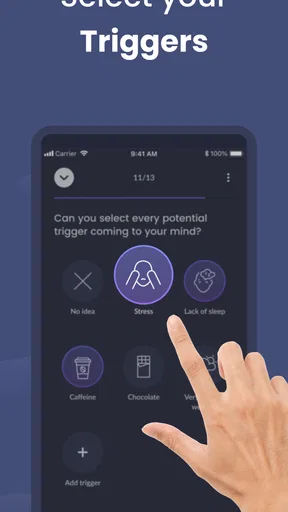
Logging a migraine is simple. The app prompts you to enter details like pain intensity, location, and duration. You can also note potential triggers, such as food, stress, or weather changes. The more data you input, the more the app can help you identify patterns.
Digging Deeper: Features That Stand Out
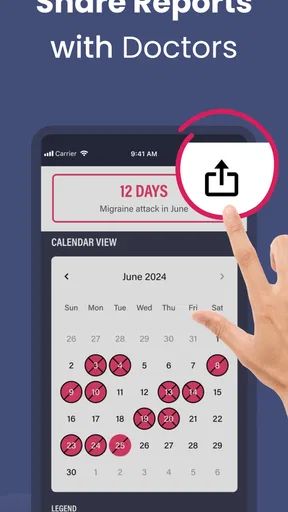
One of the standout features for me is the personalized insights. Migraine Buddy uses your data to generate reports that help pinpoint triggers and suggest lifestyle changes. For example, it might highlight that your migraines often occur after a day of high stress or poor sleep. This kind of feedback is invaluable for making informed decisions about your health.
Another aspect I appreciate is the community feature. You can connect with others who experience migraines, share tips, and even participate in discussions. It's comforting to know you're not alone in this journey, and the support from the community can be incredibly uplifting.
Integration and Customization: Tailor It to Your Needs
The app integrates seamlessly with other health apps and devices, such as Fitbit or Google Fit. This allows for a more holistic view of your health data. Plus, you can customize notifications, so you’re reminded to log details during or after a migraine episode.
Customization options extend to how you track your migraines. Whether you prefer a quick entry or a detailed log, the app accommodates your preferences. It's all about making the process as painless as possible—excuse the pun!
Room for Improvement: A Few Hiccups
No app is perfect, and Migraine Buddy is no exception. While the app offers a lot, some users might find the amount of data overwhelming. It takes time to become familiar with all the features and interpret the reports effectively. Additionally, while there's a free version, some advanced features require a subscription. Depending on your needs, you may find the premium features worthwhile, but it's something to consider.
Final Thoughts: Is Migraine Buddy Worth It?
After spending some time with Migraine Buddy, I can confidently say it's a valuable tool for anyone dealing with migraines. The app's ability to track, analyze, and provide insights is impressive. It empowers you to take control of your health by identifying patterns and potential triggers.
Whether you're a frequent migraine sufferer or someone who's just started experiencing headaches, this app can be a game-changer. The community aspect adds an extra layer of support, making you feel less isolated in your journey. If you're ready to take charge of your migraines, I’d say give Migraine Buddy a try. You might just find the relief you've been searching for.
Who is likely to get the most from it?
I think the strongest fit is someone who has recurring headaches and wants a more organized account to discuss with a clinician. That might be a person trying to remember how often episodes happen, someone comparing how attacks unfold, or a patient who wants to bring a clearer history to an appointment. The app cannot decide what treatment is right, but a record can make a conversation less dependent on memory.
It can also help a friend or family member understand why “How was your week?” may not capture the full picture. Reviewing a diary together, if the user chooses to do so, can offer a more grounded way to talk about disrupted routines and recurring difficulties. I would keep the account personal, though: community discussion can provide solidarity, but another user’s experience is not a reliable guide to what will work for me.
Making reports useful in real life
A practical example: imagine a busy week with an attack after a late night, another after a stressful workday, and a third that seems to have no obvious lead-in. Rather than deciding immediately that one factor explains everything, I would record what I can recall and look for repetition across a longer period. The useful question is not simply “What caused this?” but “What information would help me describe the pattern accurately?”
Before an appointment, I would review a few representative entries instead of trying to narrate every day. Note which details are clear, where the record has gaps, and what you want to ask. This turns the diary into preparation rather than a verdict. It also avoids overinterpreting a report that may reflect incomplete tracking or several overlapping influences.
For someone who finds writing difficult during pain, a helpful compromise is to keep the first entry brief and revisit it when feeling better. A delayed note is not perfect, but an honest note with uncertainty is preferable to a detailed reconstruction that feels precise without being remembered. If a feature or screen is confusing, I would return to the simplest episode-recording path and build familiarity gradually rather than explore every option during an attack.
Choosing it over a paper or general-purpose log
Compared with a paper diary, a dedicated app is easier to carry and can organize entries into a history and reports. Paper has its own advantage: it works without navigating screens and can be preferable for people who want complete control over a simple record. A notes app is similarly flexible, but it may leave you to invent a format and manually compare entries. Migraine Buddy’s appeal is that the subject-specific structure and community are already part of the experience.
The best choice depends on what you will actually use. If you want only a quick date-and-symptom note, paper or a basic notes tool may be less distracting. If you want to track episodes in a more structured way, the app is a more natural starting point. Neither approach guarantees that a trigger will become obvious, and a neatly arranged chart should not be mistaken for a clinical assessment.
What to know before making it a habit
Migraine Buddy is a medical app from Aptar Digital Health. It is free to install, rated for Everyone, and its current version is 86.0.1768570564; it has been available since July 8, 2014. The app has a 4.8 average from around 64,000 ratings, with roughly 9,900 written reviews and over one million installs. It supports devices running Android 8.0 or later. Those figures suggest it is widely used, but they do not tell me whether its workflow will suit your own needs.
I would also separate the app’s usefulness from the idea that tracking itself will make symptoms disappear. Its value is organizational: it can help you notice what you recorded, prepare for a conversation, and feel less alone through its community. If entering details adds stress, simplify the routine or pause it. A health diary should serve you, not become another standard you feel obliged to meet.
For a person who wants a dedicated migraine log, is comfortable entering health details, and will use the community thoughtfully, I think it is worth trying. Someone who dislikes app-based tracking, wants only a tiny private note, or expects a diagnosis should choose a simpler record or speak with a healthcare professional instead. My practical verdict is that Migraine Buddy is most helpful when used consistently but lightly: record what you know, leave uncertain details uncertain, and use the resulting history as a conversation aid rather than a promise of answers.
Pros
- Comprehensive migraine tracking features.
- User-friendly interface and design.
- Offers personalized insights and tips.
- Integrates with health apps seamlessly.
- Supports multiple languages.
Cons
- Premium features require subscription.
- May consume significant battery power.
- Occasional syncing issues reported.
- Limited customization for reminders.
- Ads in free version can be intrusive.
FAQs for Migraine Buddy: Track Headache
What is Migraine Buddy and how does it work?
Migraine Buddy is a comprehensive app designed to help individuals track and manage their migraines. It allows users to log headache occurrences, severity, triggers, and symptoms. With its user-friendly interface, the app provides personalized insights, helping users identify patterns and potential triggers to better understand and manage their condition.
Is Migraine Buddy available on both Android and iOS?
Yes, Migraine Buddy is available for download on both Android and iOS platforms. Users can easily find it on the Google Play Store and Apple App Store. This cross-platform availability ensures that users can access their migraine data from any device, providing seamless tracking and management.
Does Migraine Buddy offer any additional features apart from tracking headaches?
Absolutely, Migraine Buddy offers a range of features beyond headache tracking. It includes a community support feature, sleep analysis, medication logging, and weather tracking. These features work together to provide a comprehensive overview of factors affecting migraines, thus aiding users in better management and prevention strategies.
Is Migraine Buddy free to use, or are there any premium features?
Migraine Buddy offers a free version with essential headache tracking features. However, for users seeking more in-depth analysis and additional capabilities, there is a premium subscription available. The premium version includes advanced features like detailed reports and personalized insights, enhancing the overall user experience.
How secure is my data on Migraine Buddy?
Migraine Buddy prioritizes user data security and privacy. The app uses encrypted servers to store all user information securely. Additionally, it complies with data protection regulations, ensuring that users' personal and health data are handled with utmost care and confidentiality, providing peace of mind to its users.


